Showing posts with label Databases. Show all posts

Thursday, April 05, 2007

PsycArticles and the Proxy Server

I can't download APA Journals from home!

This has happened a couple of times this semester. APA reported massive downloads from our proxy server several times. To protect itself, APA blocked our proxy's IP-address from access to PsycArticles and PsycBooks. APA believes the download occurs via a robotic method. You might have noticed that last weekend until yesterday (March 31 - April 4, 2007) access was again down. (Then again, you might have been too busy watching the Gators win a 2nd National Championship in Basketball!)

If this happens again, please access PsycArticles and PsycBooks through the VPN. I know that a few of you have had problems with the VPN and at least one of you have a complicated local network which the VPN interferes with. However, for most of the off campus UF community, the VPN should mimic your computer life on campus.

Monday, March 19, 2007

NPR Transcripts in LexisNexis

Searching Sources in LexisNexis -- Organic Peaches in California Depends on Immigration Reform

Last week, during spring break, I was driving home to my family in South Carolina. It was Saturday evening. I was listening to NPR and something interesting came on the radio. "Hmm," I thought. That would make a nice topic to build a blog around."

A week later, I can't remember a thing about the story. Was it about children? Something about demographics? Shoot.

When I got back to the library, I realized I could look in LexisNexis to find the transcript from NPR and figure out what I was listening to. (I could have done this from my parents' home using the VPN, but I was busy crocheting and finding furniture in junk stores.)

LexisNexis includes news sources from all over the world, including articles from newspapers, transcripts from television and radio, book and film reviews, and reports from the newswires. But on Monday morning I wanted to know what I'd been listening to on NPR, so I went to the library's home page and clicked on databases in the first column. In the second box on the databases page, I typed in LexisNexis. There are several different parts to LexisNexis -- the one that contains the news is LexisNexis Academic. (There are no scholarly works in here. I think it's called "Academic," because it's marketed to academic libraries. Yeah.)

LexisNexis will open to this screen:Click on the "Guided News Screen" tab at the top. (If you want to search all news sources, you can use this screen.)

On the next screen, choose, News Transcripts from the first dropdown menu, and National Public Radio Transcriptions from the second dropdown menu:

Notice that you can also get transcripts from the Newshour with Jim Lehrer, the Official Kremlin Intnl News Broadcast, and CNBC/Dow Jones Business Video among others. If you look at all of the drop down menus from the first box and their secondary dropdown menus (i.e., the second dropdown menu changes depending on the first menu) you'll find an amazing variety of sources. Enjoy!

Then, to find the report I was listening to, I remembered that I drove from about noon til 7pm on Saturday. The earlier time I listened to audio books. So I must have been listening to All Things Considered. My search looked like this (Note "all things" in the "show" field):And the results:
There it is! A peach farmer in California talking about the need for large numbers of workers to support organic farming. He sees legalizing immigration from Mexico as the only way to make delicious tasting peaches.

However, as I look at the list of transcripts, I realize that I must have started listening after the reports on the large numbers of child abuse cases reported by juveniles in institutions in Texas and across the United States. Hmm...many interesting articles...

(If you use LexisNexis to search newspapers, you can search just the Miami Herald by choosing U.S. News in the first box, Florida New Sources in the second, and Miami Herald in the very bottom box: StepFive: search this publication title.)

Friday, February 16, 2007

Selecting a Database

So, Which Database Should I Use Already?

One major problem researchers often encounter is deciding which database to use. UF Librarians develop Subject Guides listing databases for each domain, but the lists may include 20 databases! How is a confused student to decide among them? Mostly, folks just use the databases they always use. Often it's not a good one for what they're looking for. And then they say...

"I can't find anything about sleep disorders! Someone must have written about it! I see it on TV commercials all the time."

Well, Sociological Abstracts is probably not the best database to find articles on sleep disorders. (Though I was surprised to find some interesting things on it there. But they might not be what a psychology students expected or needed.)

What are the differences between databases?
  • Which journals does the database index?
    • Which subject area are the journals in?
    • Are the journals all in one subject area or are the journals in all subject areas?
    • Are the journals almost all scholarly or almost all popular or is there a mix?
    • How many journals are covered?
  • What does the database index besides journals?
    • Does it include books, chapters in books, websites, encyclopedias, dissertations?
  • Does the database include abstracts or summaries of the articles or just citations?
  • Does the database have an interface that's easy to use?
    • Do you have a choice of interfaces?
    • Is the interface not easy, but powerful (You can find everything, if you spend a lot of time learning how to use it. Some well-designed interfaces are both.)
Here is a chart that compares the features of databases useful in our departments. I will writing more about making these decisions later. Enjoy!

Sunday, February 11, 2007

Criminalization of Mental Illness

The Imprisoning of Deinstitutionalized Mentally Ill People

Last Sunday night, CBS's 60 Minutes reported on the death of Timothy Souders, a young man with Bipolar Disorder, who was in prison for shoplifting. The major contention of the producers is that since the deinstitutionalization of people with chronic, severe mental illnesses many are being shunted into the prison system. They are not able or willing to deal with them, not sensitive to their needs. Not aware of their illnesses.

For instance, people who are diagnosed as suicidal and may cut themselves (e.g. cut out pieces of their organs), the prison staff may call "manipulative with extreme behaviors."

Here is a search from PsycINFO about the prison system and deinstitutionalization.
(Remember you'll have to be logged into the library either by its proxy system or the VPN to access these articles.)

Frontline has a program (you can watch online) called The New Asylums, along with a website with more indepth interviews and research material.

I understand this response and the feeling that we might want to reopen or find havens for chronically ill people, but I also worked at a state mental hospital during graduate school. Horrible events occurred there.

If we do decide to find homes for people who are severely ill, we need to think hard about how to make them good places for the patients/residents living there and the staff working there. The working conditions at the state mental hospital took control and dignity away from the staff. Of course the residents suffered. There was a reason the State Hospitals were closed in the first place. It wasn't only because the drugs seemed to be miraculous. It was also because the hospitals appeared to be hellish.

Some books to look at:

Deinstitutionalization : promise and problems
San Francisco : Jossey-Bass, c2001.
EDUCATION LIBRARY -- -- RA790.A1 N43 no.90

The role of the state hospital in the twenty-first century /
San Francisco : Jossey Bass, 1999.
EDUCATION LIBRARY -- -- RA790.A1 N43 no.84

Baum, Alice S.
A nation in denial : the truth about homelessness /
Boulder, Colo. : Westview Press, 1993.
LIBRARY WEST -- -- HV 4505 .B378 1993

Monday, January 29, 2007

Databases, Indexes, Print and Online

Recently 2 graduate students asked me if online databases would find print journals articles as well as electronic ones. And, they wanted to know, would they find articles that weren't in their own database. "Would Sociological Abstracts find journals that weren't full-text in Sociological Abstracts?" That was pretty ironic, since Sociological Abstracts actually contains no full-text journals.

"Huh?" you say. "I found an article that was online from SA just yesterday." Yeah. Sort of.

This explanation might bore you to tears (which is why we rarely tell anyone). On the other hand, it might clear up everything in the world for you.

Here's my beautiful diagram:
The first two boxes under the main database box show that some databases only index journals and articles, but don't have full text themselves. In our fields, these are the databases used most often, like LLBA, Sociological Abstracts, and PsycINFO.

You look through these databases for articles of interest. If you find one, our software, called SFX uses DOIs (digital object indicators -- links directly to articles) to find the ARTICLES we have access to through other databases. Sometimes articles don't have DOIs or our SFX database isn't up to date. Then you can follow the link to our catalog where wel list whether we have print copies of the journal or whether we subscribe to the e-journal for any period. (It doesn't tell you if we have the particular ARTICLE there.) If we have subscribe to some period of time (through any database), it will link to our database of e-journals and then to the database where the journal is. You need to look for the article there.

Other databases only contain full text journals -- most of these are publisher's databases or Open Access databases. In the Social Sciences you generally don't use these to look for articles. They are basically archives of journal articles. Generally, you use SFX or serial solutions to provide links between the indexing databases and the archiving databases.

But there are other databases. Like Academic Search Premier or Gale's OneFile. These have journals from lots of different publishers. The database indexes all kinds of articles, scholarly and popular, from all different fields -- science, social science and humanities. Some is full text, some are just citations.

So you can look up citations to full text or print in almost any index and find full text and print articles there. Link to them. Link to the library catalog. Pretty much just play around for as long as you'd like. I hope this made some sense and was a bit interesting to you...

Wednesday, January 17, 2007

African American Newspapers

The Historical Context of African American Newspapers: The 19th Century and The Chicago Defender

When Woodrow Wilson was mentioned in the Chicago Defender, it stated "President Woodrow Wilson (white) yesterday announced..." because that was how the African Americans of the time were cited in white-owned papers.

Last weekend I was watching TV (okay, so I watch a lot of TV while knitting and spinning) and I saw a fantastic program on PBS called The Black Press: Soldiers without Swords (Video #4678). Like much of what passes for entertainment on television today, it was fascinating. It delved into the blossoming of Black-owned newspapers all over the country after the Civil War when African Americans, especially in the South, were first allowed to read and write and used their literacy to keep abreast of what was happening in their world and also to actively change it.

When certain cities, again especially in the South, outlawed the distribution of the newspapers, Pullman Porters distributed them between towns by tossing bundles of them off trains. They said each purchased paper of the Chicago Defender was read by 4-5 people, since they were passed among friends.

More information, the entire transcript of the program, additional transcripts and videos of journalists, historians, and everyday folks talking about the importance of Black-owned newspapers are available free on PBS's website: The Black Press.

The UF libraries have electronic access to a database of African American Newspapers from the 19th century. We also have access to the Chicago Defender through the Black Studies Center.

In addition, if you search in our catalog under the subject "african american newspapers," you'll find 6 newspapers. However, if you look at that result list, you'll see that in many entries "african american newspapers" is followed by the name of a state in the U.S. Thus, we have a newspaper or newspapers from that state in microfilm. We probably have newspapers from at least 20-25 states. Often more than one from each state. (The following is just one page of the results list.)

Browse List: Subject Previous Page Next Page
No. of Recs Brief Recs Entry
3
African American newspapers -- Georgia
4
African American newspapers -- History
2
African American newspapers -- History -- 19th century
2
African American newspapers -- History -- 20th century
2
African American newspapers -- Indexes
1
African American newspapers -- Indiana
2
African American newspapers -- Michigan
3
African American newspapers -- Mississippi -- Bibliography -- Union lists
3
African American newspapers -- Mississippi -- Directories
1
African American newspapers -- Mississippi -- History

So we have maybe a hundred newspapers to wander through. And books on the history of those newspapers as well.

Go ahead and start with the online papers, but look at the papers from your own neighborhood. See if you can find your family and friends in there! You never know when you'll find a cousin, your grandmother, or the man you most admired in your life in a newspaper article!

Sunday, December 03, 2006

Remote Logon

Logon from Home with the Virtual Private Network

Most of you know that you can access almost any of our databases or e-books from home. There are 2 different ways: the Library Proxy or the Virtual Private Network, each with a set of pros and cons. (You can link to them from the link in the upper right hand corner of most library pages -- in the blue stripe -- at the link "Remote Logon." But more about that later.)
Library ProxyVirtual Private Network (VPN)
Login each time you go to library pageDownload & install small piece of software to your computer
Must click on links to navigate through pagesThen, each time you return to the library website, open the software again and allow it to connect to the library proxy.
Using the back button or the address bar will knock you off the proxyCan navigate off library website and back on again
Can not link to databases from emails, WebCT, webpagesCan enter databases from other websites, email links, or software (EndNotes)


Basically, you have more freedom when using the Virtual Private Network and fewer concerns about being knocked off the proxy. Furthermore, it's actually more secure for the library. However, if you'll only use a particular computer once, you might still want to use the Library Proxy.

So here's the deal. Here's more information about the VPN -- at the upper, left-hand corner of the page. If you're convinced, download the VPN. You'll need your GatorLink ID and password. There are versions for Windows and MACs. Contact me with any questions you have. If I can't answer them, I'll find someone who can. And enjoy easy surfing through the library resources from home, Taiwan, or Iceland!

Wednesday, November 29, 2006

Tests & Measures in PsycINFO

Find Tests, Measures and Inventories in PsycINFO

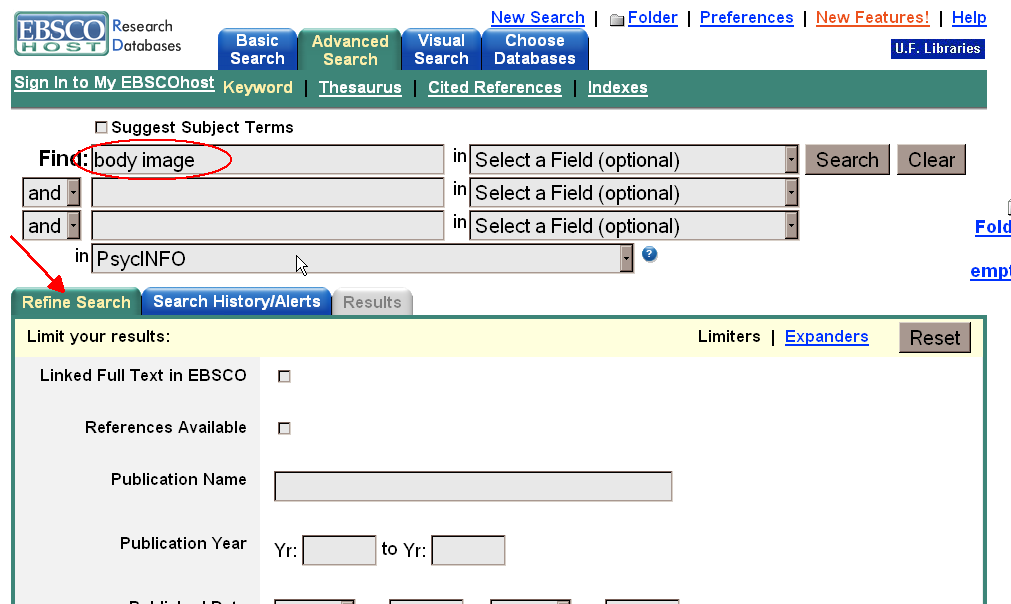
Another tip about finding Tests and Measures. When you get into PsycINFO, type in the domain of interest to you in the search box -- say, body image.
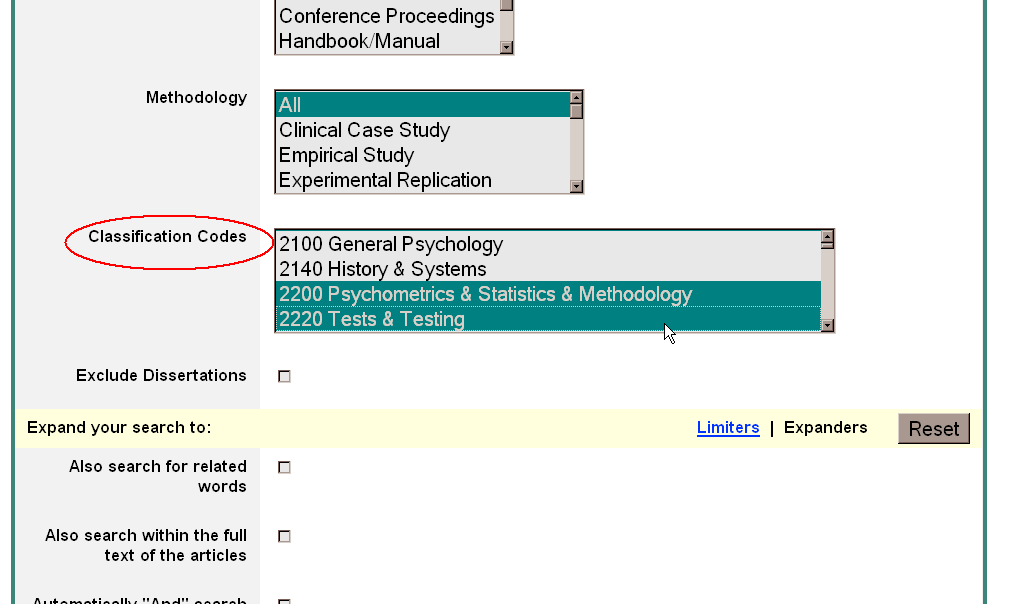
Then go to the Refine Search section below. Scroll down to the box "Classification Codes." Click on the selections

  • 2200 Psychometrics & Statistics & Methodology
  • 2220 Tests & Testing

(Use control from your keyboard and click with the mouse to click on both options.) This should bring up articles that have a strong focus on Tests and Measures in your field.

Here are the results from the Body Image search:
(Click on the picture to enlarge it.)
(I was thrilled to find out that this actually worked!)

Friday, November 10, 2006

ProQuest Black Studies Center!

The Schomburg Collection 74 Black Studies Journals The Chicago Defender in Full-Text (and even more)

We've had it for a few weeks. You might have checked it out already. If not, you're in for a great treat!

Faculty members, Graduate students, Undergraduates, Friends, Neighbors, Folks interested in fascinating stories. Do we have a database for you!

ProQuest's Black Studies Center includes one of the most comprehensive collections of the African Diaspora in the United States. Multidisciplinary essaies, an index of black studies journals, and over 1,000 full-text dissertations (yay!). It is lovely. It's just fun to play in, let alone do real work.

Before the digitalization, you would have to find a nice grant for a flight and hotel room, or a few dollars from your parents to hitch hike or ride in stinky bus stations and maybe sleep there so you could study. Then you'd have to find a blanket and sleep in the New York Public Library. But now you can stay in your own apartment, dorm, or friends' rooms in Gainesville and look up the material here in the library or on your computer at home.

The Schomburg Building at the NY Public Library is beautiful, but you probably don't want to sleep in the bus station too much. So use your computer, ours or your friends'.

You can perform a "quick search" by typing a few words in the upper left hand corner of the home page and then look at the the most interesting resources by format: essays, newspaper articles, journal articles, etc. The Black Studies center marks especially important, core articles that it considers "required reading" with a read star.

So have a good time looking through this amazing resource. You should find many different uses for it. Lots of material on language, socialization, psychology, mental health, life, love, where we are and where we've come from. Everything is here. It's a joy to have and I'm thrilled to pieces!

Thursday, September 21, 2006

Mental Measurements Yearbook & AgeLine

Mental Measurements Yearbook is Now Readable!

Mental Measurements Yearbook? Readable? What?

The Mental Measurements Yearbook (MMY) is a database of reviews of published psychological tests, inventories, measurements, and assessment tools (okay, those are all the same things). The record not only includes the review, but also the contact information, price, institutional support, development background, and theoretical background for the test.

Sounds great. Right? It's extremely helpful for students and faculty in several fields, including Psychology, Linguisitics, CSD, and Education. Not only can you find the Beck Depression Inventory, but also foreign language tests.

However, for the last few years the UF Library has subscribed to MMY through OVID, whose search interface is difficult to use. Worse yet, the full-text result had no paragraph breaks, so that a review on a test for proficiency in Hausa looked like this:


But, now, we're subscribing through EBSCO! The same article looks like this! With paragraph breaks! And everything!

Isn't that the greatest! It lessens the probabilities that I'll get a migraine trying to figure out what's going on! (To see the articles in detail, just click on them and the scans will open in their own windows.)

We've also started a new subscription to AgeLine through EBSCO now, rather than through SilverPlatter. This should also be easier to use. Please let me know if you need some guidance with either database.

Monday, September 18, 2006

e-Journal Articles

Finding e-Journal Articles from Databases


Are you in the middle of a search for articles and wonder why so few are full-text in your database? There must be more than 5 articles online about eating disorders! Golly!

Well, the UF Libraries subscribe to over 600 databases, most with full text articles that you can read in the comfort of your own bed without having to visit the library. (But we like you, so come visit occasionally. And...we have good chairs.)

If you are in one database, like Sociological Abstracts, but the article you want is in another database, JSTOR, clicking on the SFX button next to the citation will guide you to the full-text article. To see how to do this in more detail, look at the tutorial showing the steps.

On the other hand, if you know a journal you're interested in, from the Library's home page, look under the Find column (the 2nd column) and click on Journals. In the first box, type in the title of the journal you'd like:

Say, I'd like to get an article from Language from 2004.


The fourth record is for Language. You want an article from 2004, so Project Muse, not JSTOR, will have the article You want. So click on the link for Project Muse, browse through the listings there and find the article you want.

Of course, UF still owns some journals only in print. Print journals in Library West are on the 3rd Floor. Lots of journals for Psychology or Communication Science and Disorders, especially, are at the Health Science Center Library. Several Sociology Journals are at the Legal Information Center (Law School Library). The Education Library holds journals for all areas.

Many older journals are in storage or in microform. Use the online request form to request them.

Sunday, September 10, 2006

Citation Searching

Citation Searching: Finding Articles into the Future

One of the neatest databases available is Web of Science. If you have hung out in academia long enough, you might remember it as Social Sciences Citation Index. Each year, published as 3 or 4 hefty volumes. (Only for the Social Sciences edition. Every year there was also a Science edition and an Arts & Humanities edition, each having its own 3 or 4 volumes.)

Each volume, a weighty tome, with thin transulescent pages and the most minute printing possible. Scholars over a particular age might need to use a magnifying glass to scan down the columns of print. But it was a treasure trove. And the only way to find out what had been published AFTER. After the perfect article exactly on the topic you were interested in, but published 15 years ago. Surely someone had published since? How else could you look into the future from that article to today? Who else was publishing on the same topic? Perhaps the persons who had cited that perfect article.

Many databases, such as PsycInfo or Sociological Abstracts, allow "Times cited in the database," "Cited by" or similar possibilites. However, the "cited by" articles have to be in the same database. The Web of Science is multidisciplinary, including articles from over 22,000 journals, compared with just 2,000 journals covered by PsycInfo and 1,800 by Sociological Abstracts.

Web of Science also has a nice online tutorial to guide you through citation reference searching. Besides Overview, make sure you also click on, and read Cited Reference.

Another special feature of Web of Science: you can search for Related Records, meaning other articles that include the same citations in their Reference Lists. Web of Science assumes that if 2 articles share References, they're probably on the same topic. The more references they share, the closer the subject matter. When you click on the "Related Articles" link, articles are ranked by the number of shared references.

(Sometimes this is a bit wacky. I saw an article with 204 references. The original article listed 34 references. Even though the overlap included 7 papers, they were probably only rated highly related, because the 2nd article had so many references.)


Click on picture to enlarge

One cool feature not mentioned in the tutorial: you can analyze the citations to find out WHO is citing the article. Are the authors the only scholars who cite this article? Is there a small circle of scholars who cite this article, all from the same institutions as the author? Is the author internationally read? Has the article been cited continually since its publication or just for the following 2 years? Or has the article been recently picked up again after lying dormant for 15 years?

To use the ANALYZE feature, find the citations to the article you're interested in, then click on the analyze button next to the listed articles:

Click on picture to enlarge
And then choose how you want to rank the citing articles and how you want to sort the fields. (If you rank by date, sort by "selected fields." That way you'll get the results along a time line, instead of when the most papers were published, e.g., 1984, 1996, 1985, 1986, 1995, etc.)


Click on picture to enlarge

However, there are a few problems.The worst is that the citations are lifted directly from the references in the back of articles and books, meaning that there are many errors in the database. Expect to find errors of authors' names, publication dates, page and volume numbers, journal titles, etc. There are some guides to help you with this, but it is a definite problem.

The second problem is that you can really play for days in here, wandering around a winding road, leading off into lands of great interest that can distract you from your major focus. It might help to keep your topic statement somewhere nearby for those days when you absolutely have to get your work done and have no time for those more enticing bits of research play.

Good luck. Have fun. And contact me if you'd like some help or more information!

Saturday, September 02, 2006

EBSCOHost & Visual Search

Academic Search Premiere and PsycINFO: A New Visual Search Interface

EBSCOhost changed its interface over the summer, adding an optional "visual search." (The traditional search is still the default, but EBSCOhost has added other features to their traditional search that will also help you.)

The visual search groups articles by subject into a visual map, making it easier to see what you've found at a glance. So if you search for "depression and aging," you might get a result looking like this:

With a traditional search you get a long list of articles, requiring you to browse through pages and pages, looking for what you want. Or you have to know exactly what you want before you start. It's hard to find articles serendipitously.

Get to the visual search page by clicking on the "visual search" tab at the top of the page.

Now you can see your results all at once and get an idea of what all the different articles are about. The circles are sets of articles on a particular topic, as are the spheres inside them. The boxes inside the circles are individual articles.

  • Roll over the boxes, circles, or spheres and you'll get more information about them: their subject terms, their titles, their authors, the journals.
  • Double-click on the the circles or spheres and you'll burrow down another level.
  • Double-click on a box and the article's record, including the abstract, will open on the right side of the page.
  • If you want the record to take up the entire page, just click on the arrows in the middle.
  • You can click on the SFX button to find the e-journal article or check our library catalog for print articles.
It's pretty cool!As usual, let me know if you'd like more information about the interface. If you'd like me to show this to you, your class, your lab, your pet alligator, I'm happy to meet with you.

Especially important: if you use the visual search, let me know if you like it, hate it, find it silly, or the easiest interface you've ever used.

Thursday, August 31, 2006

APA Journals Available Back to Volume 1

American Psychological Association Journals Full Text Available Back to Volume 1
and PsycBooks Online


All APA journals are now available back to Volume 1. This means that some of the older journals go back to around the turn of the 20th century, such as Psychological Review (1894) or the Journal of Abnormal Psychology (1906).

Books are online from APA as well. PsycBooks includes both older Classics -- books by Sigmund Freud, Arnold Gesell, and Kenneth Spence -- and recent publications. They are indexed and abstracted by chapter and book in PsycInfo (and on their own website at PsycBooks). Entire chapters can be downloaded, printed, and read in the comfort of your own living room or office. Topics range from child development to neuroscience to behavior modification to psychotherapy to organizational psychology. You might want to look here before you decide whether to invest in that book you were thinking of buying...